|
Birthday Reminders - Free Bday Cards - Happy Birthday Screensavers
Download Great Birthday Software for Windows
Would you like to not forget anyone's birthday anymore?
New! Free Bday cards

Features:
- Hundreds of differnet free bday cards
- Easy to develop and tons of fun
- Print and send bday cards friends and family
- Add your own photos
- Author: Freeze.com

STAR BIRTHDAY REMINDER SCREENSAVER DOWNLOAD
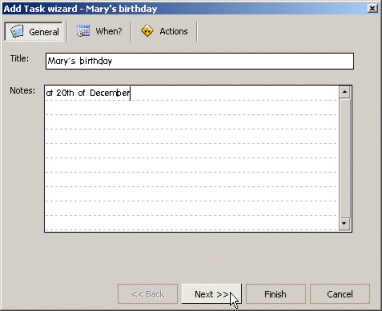
Features:
- Add Task wizard from the tray icon
- Type "your family member or friends name and birthday" in the Title field and "on
20th of December" in the Notes field. This is the message
that will appear to alert you
- Set the date/time to 15th of December (in order to be
reminded five days before her next birthday). Check the Repeat task checkbox and choose the "every 1 year(s)" radio button.
Click on the "Next >>" button
- Select
the "happybirthday.wav" sound and click on the "Finish" button.
Your first anniversary reminder is set
- When the reminder pops up on 15th of December and you
are notified about a birthday, click on the Snooze
button and choose "snooze for 1 day" in case you want to
be notified again the next day. You can snooze the
birthday task until the 20th of December. Then press the
Dismiss button an the task will be set to fire again
next year at 15th of December
-
Author: StarMessage.info
|
|
 Screensaver Download
We promise you
the
Moon and Stars,
and We Deliver !

Screensavers Downloads
Screensavers

|
|
|
If you liked our site don't keep it secret
Email this page to your friends!
|
|
Email to a friend »
|
Moon Screensavers
Copyright © 2002-2011 www.Screensaver-Download.com
privacy -
|