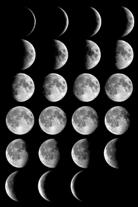
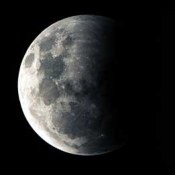
moon phases screen savers

The StarMessage Screensaver

How to configure the screensaver

 
Frequently Asked Questions.

I do not see the moon phase
Please go to the settings of the screensaver and make sure that the option "Moon Phase" is ticked.
Other reason why you might not see the moon, is that maybe there is no moon on those days (new moon days). Temporally increase the brightness of your monitor to see if a dark blue moon appears in the screen. After a few days the moon will start appearing.

How do I change the default message that is written in the stars?
Go to the settings of the screensaver and change the message.  Press the "More Options" button and go to the "Star Messages" tab and change any other messages that are preconfigured.

The percentage of moon phases are not showing any more.
The scrolling bottom line will show you the percentage of the moon that is illuminated. If this percentage has stopped showing up, go to the settings of the screensaver and make sure that there is some text typed in the bottom line (you can even type a "space" character). If the bottomline is empty from text, the percentage is not shown.

I get an "error in IniFile Read: too long string"
Please go to the settings of the screensaver and check the message and bottomline texts that you have typed. One or more of them is too long. reduce the length and the problem will stop. If you have typed multiple messages (from the "More Options" button and the "Star Messages" tab), then you must check for their length as well.
 

How to uninstall the StarMessage screensaver
1) Go to the "About" tab of the program and select "Uninstall".
Or, go to the Control Panel, Add/Remove programs and select StarMessage Screen Saver from the list of the installed programs and press the Add/Remove button to start the removal.

2) Choose the "Custom" uninstall option and select all the files. In some cases the uninstall information might get lost (especially if you don't select the "custom" option mentioned above. You might get the error "cannot open install.log" file.
For those cases, you can manually delete the starmessage files to uninstall the screensaver.
Find and delete all the "starmsg.*" files from your hard disk.
Use the search and specify the option to "search for ALL files", if such an option exists in the specific version of your windows.
The files that should be found and can be safely deleted are:

starmsg.scr
starmsg.hlp
starmsg.exe
starmsg.ini

You do NOT need to delete any other files. There is not a specific folder for the screensaver and you should NOT delete any folder.


On which operating systems and computers does the software run?
Our software is compatible with all the 32 bit versions of Microsoft windows.
 
downloads for windows 95 and windows 98 - current  moon phasessoftware for windows NTsoftware for windows MEsoftware for windows 2000downloads for windows XP

Do you accept payments via PayPal?
Of course! When you click on the Buy Now link, select US dollars as the preferred currency and in the next screen you will have the option to select PayPal. If you are in a country other that US with a different local currency, selecting US dollars does not affect the actual amount that this product costs.
 

Can I pay for the program without using my credit card?
Yes, Please go the normal way to the registration page, select the currency you prefer press ORDER and in the next screen select the "Check/money order" option (instead of "credit Card").
 
Who do I make the check payment to?
Please start the ordering procedure from the normal link and select check/money order as your payment method. Then you will be given the payment address and the order ID to write on you check. Please follow those instructions
 
I sent you an email to request support, but I haven't had any response.
We reply to all email requiring for support with priority to the registered users. Common reasons why you did not get an answer are:
- Your email spam filters have blocked our answer email. Please check your email blocking rules.
- You have mistyped your email address. Please check the email address.
- Your email was blocked by our email filters. Please resend your question.
 
How do I send you a screenshot of a technical problem that I see?

A picture is worth 1000 words, they say. If you see something is wrong with the program, press the "Print Screen" button on the keyboard.
You have now placed a screenshot in the clipboard.
You can now go to Microsoft word or to Microsoft Paint (Start->Accessories->Paint), PASTE the image in a new file and send that file to us.


When trying to install the program, I get a remark about an "unknown publisher".
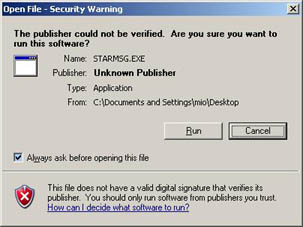
download from internet security warning unknown publisherThis remark automatically comes out from windows XP whenever you download programs from the internet and the program is not "digitally signed by an established authority". The procedure to "digitally sign" a program is very expensive and not used by mid/small sized companies. Only big companies can afford to digitally sign their programs. Therefore, the majority of the programs available for download, will also show this message.

You can safely ignore that message for our products
that are downloaded from our official download locations.

Whenever you download programs from the internet you should make sure you download them from their original site. For example, you must avoid downloading programs from other users via a p2p file sharing utility.

The "official" download locations for our software are:
StarMessage screensaver: http://download.starmessage.gr/STARMSG.EXE
The StarMessage Diary: http://download3.starmessage.gr/stardiary.exe
StarReminder: http://download5.starmessage.gr/starreminder_setup.exe


Do you have an agent that resells the program in my country?
Currently, our programs are distributed electronically (via downloads) and the payments are done online. These two options allows us to "distribute" our products virtually to the whole planet, while maintaining a very low price from which our customers benefit.
 
Does your software run on MacOS,MacOSX / Macintosh /Apple computers?
As you can see both in our main product pages and in our ordering pages, our software is designed to work on Windows operating system. There are no planned versions for MacOS and Macintosh computers. If you have a windows simulation program installed on your apple computer, you can try the free version of our program to see if its runs on Macintosh.


I enjoy this software. Do you have other products?

Other Great Products
Please have a look at our selected software products

A list of other Software/Shareware »

screen savers, www.screensavers.com
StarMessage.gr

StarMessage in a glance...

¤ Shows the real moon phase.
¤ Notifies you of the upcoming full moon and full moon name 1 day before.
¤ Shows your messages written with the stars of the night sky.
¤ Notifies you of new emails.
¤ Contains relaxing sounds of ocean waves, lullabies, birds.
¤ It is simple and easy to use. It does not interfere with other parts of your computer system.
¤ It is completely free of 3rd party software like Ad-Ware or Spy-Ware or Malware.
¤ Easy to install and remove.
¤ Compressed size (~ 1 MB) for quick download.
 

kids children screen saver
What do other users of screensavers say...
¤ From the several screensavers that I have seen and/or tried over the years, this is the only one that I have found that combines humor, sentimentality and technical information.
 

S Bridge
 

¤ I downloaded the trial and was so pleased with it I HAD to register it. It's great to look at, its a good communication tool. I leave greetings, messages there for other family members. Its amazing and practical, worth every penny and A+ customer support.
 

Janice Brown
 

¤ This is by far the very best screen savers one can find. Lost hard drives etc....I will reinstall each and every time. Have had since 98 and wouldn't change it for one second. Who can ask for more than the 'moon and stars'?
 

Sherry Smothers
Sarasota, FL
 

¤ I LOVE this product! It is wonderful to sit back and watch the stars "fall into place"! Blessings and thank you.
 

Ronald G. Cosseboom
 

Read more opinions »


romantic screensaver for women

How to make it yours
¤

Payment options include secure online credit cards, credit cards via phone or fax, money orders, checks, bank wire transfers and PayPal.
screen savers buy online

Yes! Make it yours
(NOW for just $12.95)
shop buy software astronomy screen saver
¤ Registration is an one time small fee and contains free updates to future versions of the screen saver.
The program is distributed electronically (download) and is activated according to the simple instructions that you will receive via email.
¤ For any questions, please email us.
 

If you liked our site don't keep it secret
Email this page to your friends!
Email to a friend »


moon phases, full moon calender
Interested in the moon and the moon phases? »»

 
If they expect from you the moon and the stars, now you can offer them!
Make it yours or give StarMessage as a gift »

Thank you for visiting the StarMessage screensavers site
 and reading it to the end..

Click here to go to the top of the page


©2008, StarMessage.gr
--------------------------
email: o@StarMessage.gr

Sign up for PayPal and start accepting credit card payments instantly.